This guide is designed to help maximize your effectiveness in managing and customizing your SharePoint site. As a Site Owner, you play a crucial role in ensuring that your site meets the needs of your team or organization. This guide will walk you through a few essential features and tools available to you, empowering you to create, organize, and maintain a successful SharePoint environment for your users.
Important: You do not have authorization to create your own SharePoint site. To request a new Team Site or Communication Site for your department or team, please submit a ticket through Service BCIT. Upon approval, you will be assigned as the Site Owner.
Information about SharePoint
Team site: collaboration central
Imagine a team site as a virtual workspace for your team. It’s all about working together. Team sites are great for projects where everyone contributes and needs access to shared documents, files, tasks, and calendars. Think of it as a shared notebook where everyone can add ideas, edit documents, and track progress.
Permissions are typically set up through Microsoft 365 Groups, making it easy to manage who can access and edit what.
Communication site: broadcasting information
A communication site is more like a broadcast channel. It’s for sharing information with a wider audience, like company news, events, reports, policies, or department updates. Content is usually created by a select few and viewed by many.
Permissions are managed through SharePoint groups, with editing rights limited to content creators.
When creating a new site on SharePoint, it’s important to consider the information classifications outlined by the Information Access and Privacy Office (IAPO) and the Cybersecurity and Information Security Office (CISO). The following guidelines detail the types of content appropriate for your site, based on its classification and intended audience.
| Content type | Description | Examples | Risk |
|---|---|---|---|
| BCIT Personal | Personal information, which includes any data that can identify an individual, must be carefully protected to prevent serious privacy breaches. At BCIT, access to personal information is strictly limited to authorized users who have a legitimate business need. |
|
|
| BCIT Confidential | Sensitive Institute information, if improperly disclosed, could result in a loss of confidence in BCIT, diminish competitive advantage, and harm partnerships, relationships, or reputation. Access to BCIT confidential information is strictly limited to authorized users with a legitimate business need. |
|
|
| BCIT Internal | Institute data used in daily operations at BCIT or within its departments is considered internal information. Access to BCIT internal information is restricted to authorized users and is not routinely disclosed. |
|
|
| BCIT Public | Information that is publicly available, routinely disclosed, and generated in the normal course of business, with little to no risk of harm. |
|
|
SharePoint consists of three major building blocks:
- Sites – Used to organize various type of content (web parts)
- Pages – Used to display content (web parts) on a Site.
- Web Part – Used to display particular content/information (i.e. documents, events, contacts).
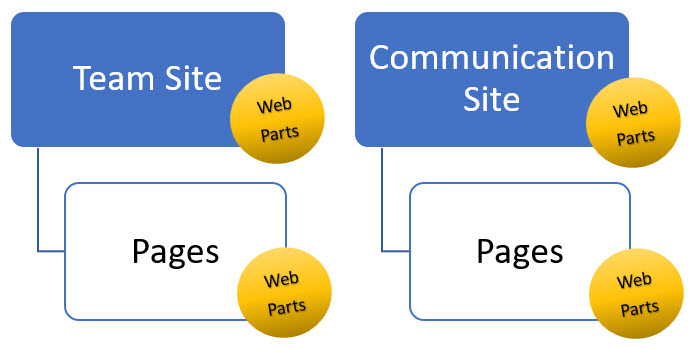
What are sites?
A site in SharePoint is a collection of related web pages, lists, libraries, and other resources. It serves as a container for organizing and managing content and activities within a specific scope, such as a team site or a communication site.
What are pages?
A page is a single web document within a SharePoint site. Pages can contain text, images, links, videos and other types of content. Pages can be used to create content within a site, such as news articles, informational pages, or team announcements. They are used to present information and provide a user interface for interacting with the site’s content.
What are web parts?
Web parts are modular components that can be added to pages in SharePoint to customize the layout and functionality of the page. Each web part serves a specific purpose, such as displaying a list of items, showing a calendar, or embedding a document. Web parts can be added, removed, and configured to meet the needs of the users and the site.
Summary
A site is a collection of resources, pages are individual documents within the site, and web parts are components that can be added to pages to enhance their functionality.
When you log into SharePoint, you interact with individual sites and the content stored in those sites based on the permissions that you have been granted. SharePoint uses role-based access control, which means that your SharePoint Administrator or your site owner can very precisely control access to content.
Default security groups (predefined)
These are user categories with predefined access levels. Every site has these three default security groups associated with it:
| Site owners | Site members | Site visitors |
|---|---|---|
|
|
|
Site permissions (granular control)
As a Site Owner you will have to make a decision on what type of access you need to give.
These permissions are more granular and can be assigned to individual users or groups within the default security groups.
- Full Control: Users with this permission have complete control over the site, including the ability to manage permissions, add or remove content, and customize the site’s design.
- Design: Allows users to view, add, update, delete, approve, and customize the site’s design.
- Edit: Users can add, edit, and delete lists; can view, add, update, and delete list items and documents.
- Contribute: Users can add, edit, and delete items in lists and libraries.
- Read: Users can view pages and items in existing lists and libraries.
Microsoft Support:
Managing your site
As a Site Owner, you have the ability to set the permissions at the Site level.
- Click Settings (gear) icon, and select Site permissions.

- Click Change how members can share.

- Choose the sharing permissions you wish to grant Site Owners and Site Members for your site, and then click Save.

To grant individuals access to your site, add them to either the Owners, Members, or Visitors group. The group they are added to will determine their level of access.
Important: Site Owners bear the sole responsibility for managing the membership of their SharePoint sites. Only they have the authority to add or remove members, ensuring the security and integrity of the site’s content. Failure to adhere to this responsibility may result in unauthorized access to sensitive information, compromised data security, and potential violations of organizational policies or regulations. Site Owners play a critical role in maintaining the confidentiality and accessibility of their site’s content, and it’s imperative that they exercise this responsibility diligently.
The Owners group should have a small number of members, ideally between two and four.
To change site permissions:
- Click the Settings (gear) icon, then select Site permissions.

- At this point, you may see two different button options. The reason you see an Add members button or a Share site button depends on your permission level on the SharePoint site.
- Add members – This button is visible to users with Owner permissions. Owners have full control over the site, including managing permissions and adding new members.
- Share site – This button is visible to users with Edit or Contribute permissions. These permissions allow users to collaborate on the site content but not manage permissions directly. Sharing the site allows them to invite others with specific access levels.

Add members button
- Click on the drop-down arrow in the Add members box, and you will have the option to:
- Add members to group – Grants access to view, collaborate on, and potentially edit content within the site, depending on the permissions you assign.
- Share site only – Grants access to the site only, excluding other group resources like calendars and conversations.
- Click Add members to group.

- You will be able to see current Owners/Members. To add additional people, click Add members.

- Start typing the person’s name, then select them from the auto-populated list.

- When their name appears, click the drop-down arrow and assign them as either a Member or Owner.
- Click Save.

Share site button
- Click on Share site button.

- Start typing the person’s name, then select them from the auto-populated list.

- When their name appears, click the drop-down arrow and assign them with either Full control, Read or Edit access.
- You will also be able to send them an email and type a message in the provided box.
- When complete, click Add.

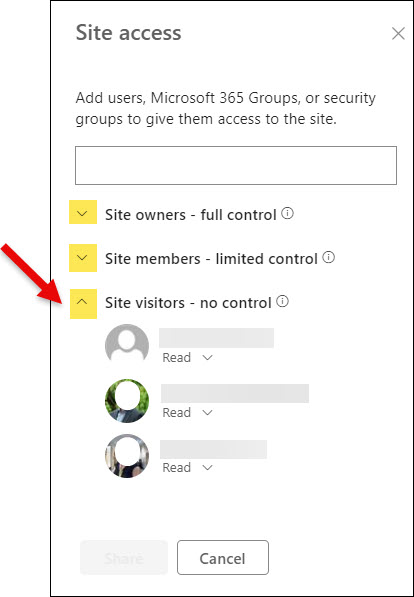
To see who currently has access to your Team Site, you can click on the drop-down arrows on the Site access window:
In a SharePoint site, Advanced permissions settings provides granular control over access and permissions beyond the basic “Add Members” or “Share Site” options. This feature allows site owners and administrators to customize permission levels for different users or groups, tailoring access to specific documents, lists, libraries, and other content. By using Advanced Permissions Settings, you can ensure sensitive information is accessible only to authorized personnel, enhancing security and compliance. It also allows for the creation of unique permission sets, providing flexibility in how users interact with the site’s content. This granular control helps maintain the integrity of the site, prevents accidental data exposure, and supports efficient collaboration by ensuring team members have the appropriate access to the resources they need.
Advanced permissions settings offer a deeper dive into managing permissions for:
- Users and Groups: You can grant permissions to individual users, security groups, or Microsoft 365 groups.
- Permission Levels: You can assign predefined permission levels (like Edit, Contribute, Read) or create custom permission levels with specific access rights.
- Breaking Inheritance: By default, permissions are inherited from the parent site. Advanced settings allow you to break inheritance and set unique permissions for a specific site, list, library, or item.
- User Permissions: You can view and edit existing permissions assigned to users and groups, allowing for fine-tuning access control.
Think of it as the “backend” of permission management in SharePoint, offering a more comprehensive way to manage who can access what and at what level.

You can also click on the specific permission-level groups to add/remove users.
In the Advanced Permissions Settings of a SharePoint Team Site, the navigation bar typically includes several key buttons and options to help manage user permissions efficiently.
Note: The buttons available to you depends on the access you’ve been granted as a Site Owner, or whether the control is disabled within your organization.

- Grant Permissions – allows you to assign specific permissions to users or groups, enabling you to add them and specify their permission levels, such as read, contribute, or full control.
- Create Group – Lets you create a new SharePoint group, defining a group name, description, and assigning a permission level to manage a set of users collectively.
- Edit User Permissions – You can modify the permissions for existing users or groups, ensuring they have the correct access.
- Remove User Permissions – Enables you to revoke permissions from users or groups, effectively preventing them from accessing the site or specific content.
- Check Permissions – Helps you verify the permissions assigned to a particular user or group by entering a name to see their effective permissions.
- Permissions Levels – Allows you to view, create, or modify permission levels, customizing specific actions that users or groups can perform, such as view, edit, or delete.
- Access Request Settings – Manages the settings for access requests, configuring how users can request access to the site or its content and specifying who will receive these requests.
- Site Collection Administrators – Manages the list of site collection administrators, enabling you to add or remove administrators who have full control over all sites within the collection.
These buttons provide comprehensive tools for managing permissions, ensuring that access is appropriately granted, modified, and monitored to maintain site security and efficiency.
To customize the look and feel of your SharePoint site, including changing the template and logo:
- Click on Change the look in the settings menu.

- When changing the look in SharePoint, you can customize the Theme, Header, and Navigation options to personalize the appearance and functionality of your site.

- To change the site logo, click on Header, and then scroll down to edit logo.

Microsoft support:
In a SharePoint Team Site, the Local Quick Launch menu is a navigation menu located on the left side of the site’s interface. It provides quick access to important site contents, such as lists, libraries, and pages, allowing users to navigate the site’s structure efficiently. The Local Quick Launch menu is customizable, allowing site owners and administrators to add, remove, or reorder links based on the site’s needs. This menu is particularly useful for users to easily find and access relevant content within the Team Site, enhancing collaboration and productivity.
- Select Edit at the bottom of the vertical navigation menu.

- To modify existing titles, click on the ellipses (•••) located to the right of the title. From there, you can choose to Edit, Move up, Move down, Make sub link, or Remove.

- To add a new title, position your cursor between the existing links in the menu where you want the new link to appear. Then click on the + symbol. .
- When the Add dialog box appears, select one of the link options provided to specify the behavior of the new link.
- Link will add a link to any site, internal or external to your company. Just enter the address and display name for the link.
- Label will add text to your navigation menu that is not hyperlinked. A label is useful if you want to organize or categorize your links.
- Conversations will add a link to the Microsoft 365 group conversations associated with the team site. Just enter a display name for the link. The address is automatically added and cannot be edited.
- Calendar will add a link to the Microsoft 365 group calendar associated with the team site. Just enter a display name for the link. The address is automatically added and cannot be edited.
- Notebook will add a link to the OneNote notebook associated with the team site. Just enter a display name for the link. The address is automatically added and cannot be edited.
- Planner will add a link to the Microsoft Planner instance associated with the team site. Just enter a display name for the link. The address is automatically added and cannot be edited.
- Note: Select the Open in a new tab checkbox to have the link open in a new browser tab.

Microsoft support:
Web parts are essentially building blocks that can be added to a SharePoint page to customize its functionality and appearance. They allow you to add dynamic content, such as lists, libraries, charts, and forms, to your pages without requiring any coding knowledge.
Web parts can be added, removed, and customized directly within the SharePoint page editing interface, making it easy to tailor your pages to suit your needs. They can also be configured to display different views or filter data based on user input, providing a dynamic and interactive user experience.
Adding a new web part
- In your Site, click on Edit.

- Move your cursor to the area of the page where you want to add the web part. You can add a web part in between existing web parts.
- Click on the “+” icon when it appears in the area you selected.

- A window will open, providing a Grid view of all the web parts. Scroll down to view more web parts.

- Click on List view to get a brief description of the web parts.

- Once you’ve identified the web part you want, simply click on it to add it to your page.

Note: Many web parts offer customization options. Clicking on a web part opens the property pane on the right side. Within this pane, you can configure specific settings such as data source, display format, and more. Additionally, hovering your cursor over the icons in the editing bar reveals their functionalities. - When you’ve finished editing your web part, you can choose to Save as draft in case you plan to continue working on it later. Alternatively, if you’re ready to make your changes visible, click Republish.

Editing an existing web part
- In your Site, click on Edit.
- When you hover your mouse, you’ll see a border appear around each web part on the page.
Note: If you see a “+” icon, do not click on it as this will create a NEW web part. - Locate the specific web part you want to modify, and click on it. A small toolbar will appear by the web part.

- Click on the pencil icon within this toolbar to open the editing options.
- A panel will open at the right providing more editing options for that specific web part.
- When you’ve finished editing your web part, you can choose to Save as draft in case you plan to continue working on it later. Alternatively, if you’re ready to make your changes visible, click Republish.

Editing the section of your web parts
- In your Site, click on Edit.
- Click your cursor onto the whole section, and a toolbar will appear at the left.

- Click on the Edit section icon and a panel will open at the right. You can adjust the Layout options, as well as the Background options.
- When you’ve finished editing, you can choose to Save as draft in case you plan to continue working on it later. Alternatively, if you’re ready to make your changes visible, click Republish.

Microsoft Support:
Create a document library in SharePoint to securely store files where you and your co-workers can find them easily, work on them together, and access them from any device at any time.
A document library provides a secure place to store files where you and your co-workers can find them easily, work on them together, and access them from any device at any time. For example, you can use a document library on a site in SharePoint to store all files related to a specific project or a specific client.
To set up a Document Library in a Team Site in SharePoint, you can use either the New button or a Web Part, depending on your preference and the specific requirements of your site. You can create more than one Document Library in a Team/Communication Site.
Both methods are valid and can be used depending on your specific requirements and preferences. If you want a more integrated and customizable experience, using a web part may be the preferred option. However, if you prefer a simpler and more direct approach, using the New button is also a viable choice.
Note: By default, SharePoint libraries inherit permissions from the parent site. This means whoever can access the site can also access the library (unless Site Owners set up unique permissions for the libraries).
It is recommended to use the New button when setting up a Document Library with highly controlled permissions.
Using the New button
This method allows you to create a Document Library directly from the site contents page, and appear on your Quick Launch menu.
- In your Site, click on + New, and select Document library from the list of available apps.

- You’ll choose between a Blank library and From existing library based on your needs:
- Blank library: Choose this option if you want to create a new, empty Document Library. You’ll start with a clean slate and can add columns, content types, and other customizations as needed.
- From existing library: Select this option if you want to create a new Document Library that is a copy of an existing one. This is useful when you want to replicate the structure and settings of an existing library, including columns, views, and other configurations.

- Enter a Name for your Document Library. Add a Description if necessary. Make sure the box is checked beside Show in site navigation if you want the title to show up in the menu bar. Then click Create.

Tip: When naming your Document Library, remember that the name will become part of its URL. It’s best to avoid using spaces in the name, as they will be replaced with “%20” in the URL, which can cause issues with certain applications, such as some search functions. Instead of using spaces, consider using an underscore, a hyphen, or typing the name as one continuous word.

(i.e.) If you use a blank space:
- Your new Document Library will be created and added to the Quick Launch bar.

Using a Web Part
Using a document library as a web part in SharePoint offers customization options, such as choosing views and applying formatting. It allows for better visibility control, integration with other web parts, easier navigation, and space-saving on the page. This approach enhances user experience and site usability.
- Click Edit to enter edit mode on your SharePoint site.
- Hover your cursor over the area where you want to add the web part until you see the “+” icon, then click on it.

- In the web parts pane, search for Document Library and select it.

- Select Document library.

- The new Document library web part will now appear in the section.
- Customize the web part setting by clicking the pencil (Edit web part) icon.
- Click Save as draft, or click Republish to save the changes.

- Your Document library web part is now added to your site.

Microsoft Support:
In SharePoint, a list is a collection of items that are related to each other. It’s a way to organize and store information, similar to a table in a database or a worksheet in a spreadsheet. Lists in SharePoint can be used for various purposes, such as tracking tasks, managing contacts, or tracking issues.
To set up a List in a Team Site in SharePoint, you can use either the New button or a Web Part, depending on your preference and the specific requirements of your site.
Both methods are valid and can be used depending on your specific requirements and preferences. If you want a more integrated and customizable experience, using a web part may be the preferred option. However, if you prefer a simpler and more direct approach, using the New button is also a viable choice.
Note: By default, SharePoint lists inherit permissions from the parent site. This means whoever can access the site can also access the library (unless Site Owners set up unique permissions for the lists).
Using the New button
This method allows you to create a List directly from the site contents page, and appear on your Quick Launch menu.
- In your Site, click on + New, and select List from the list of available apps.

- You’ll choose between Blank list, From existing list, From Excel, or From CSV based on your needs. You can also select templates from Microsoft.
- Blank list: his option allows you to create a new list from scratch. You can define the columns and settings based on your specific requirements.
- From existing list: This option allows you to create a new list by copying an existing list. You can choose an existing list from your site and copy its structure, including columns, settings, and content (if desired).
- From Excel: This option allows you to create a new list by importing data from an Excel spreadsheet. You can map the columns in your Excel spreadsheet to the columns in your SharePoint list.
- From CSV: Similar to the “From Excel” option, this allows you to create a new list by importing data from a CSV (Comma-Separated Values) file. You can map the columns in your CSV file to the columns in your SharePoint list.

- Enter a Name for your List. Add a Description if necessary. Make sure the box is checked beside Show in site navigation if you want the title to show up in the menu bar. Then click Create.

- Your new List will be created and added to the Quick Launch bar.

Using a Web Part
Creating a list in SharePoint as a web part offers advantages such as integration into various parts of the site, improved visibility and accessibility, customization of appearance and behavior, ease of use for users, and consistency in presentation across pages. This approach enhances the user experience, improves productivity, and provides greater flexibility and control over list display and access.
- Click Edit to enter edit mode on your SharePoint site.

- Hover your cursor over the area where you want to add the web part until you see the “+” icon, then click on it.

- In the web parts pane, search for List and select it.

- The List web part will now appear in the section. Select a list by clicking on Lists inside the section.

- Customize the web part setting by clicking the pencil (Edit web part) icon.
- Click Save as draft, or click Republish to save the changes.

- Your List web part is now added to your site.

Microsoft Support:
Special permissions for a document library or list in SharePoint are often desired to restrict access to sensitive or confidential information. By setting up unique permissions, you can control who has the ability to view, edit, or delete specific items. This level of granularity is useful when you have documents or data that should only be accessed by certain individuals or groups within your organization. It allows you to maintain confidentiality, ensure data integrity, and comply with security policies and regulations.
By default, SharePoint libraries and lists inherit permissions from the parent site. This means that anyone who can access the site can also access the library or list, with some variations depending on settings.
The Stop Inheriting Permissions button breaks this link. Once clicked, the document library or list becomes permission-independent, allowing you to set unique permissions for that specific library or list only. This lets you:
- Grant access to specific users or groups for the library or list, even if they don’t have access to the main site.
- Restrict access to the library or list for certain users or groups, even if they have access to the site.
Using the Stop Inheriting Permissions button
Note: The examples in the screenshots below use a document library for illustration. The process for lists is similar.
- Go to the Document Library for which you want to manage permissions.
- Click the gear icon in the top-right corner and select Library settings.

- Click on More library settings.

- Under the Permissions and Management section, click Permissions for this document library.

- Optionally, you can click on & review the specific permission-level groups, which typically default from the site level.

- Click the Stop Inheriting Permissions button to create unique permissions for the library.

- A message box will appear requesting confirmation for creating unique permissions. Click OK.

- To refine the default permissions at the site level, you can (1) review specific permission-level groups and adjust their permissions as needed, or (2) start fresh by removing all permissions from group:
- Select the group(s) you want to manage, and then click the Edit User Permissions button. In the next screen, your selected groups will appear. Select the new permission level, and click OK.


- Select the group(s) you want to remove, and then click the Remove User Permissions button. After they are deleted, this will allow you to personally add the users and assign specific permission controls.
- Note: It is advisable to keep other Site Owners active to ensure that access is not solely dependent on one person, especially considering the potential for vacations or other absences.

- Note: It is advisable to keep other Site Owners active to ensure that access is not solely dependent on one person, especially considering the potential for vacations or other absences.
- Select the group(s) you want to manage, and then click the Edit User Permissions button. In the next screen, your selected groups will appear. Select the new permission level, and click OK.
- Click on the Grant Permissions button to add specific users or groups and define their access level (Edit, View Only, etc.) for the library.

- A window will appear where you can add people by entering their names or email addresses, and include a message if needed.
- After adding the users, click the SHOW OPTIONS link.

- Click on the drop-down arrow to select a specific permission level for the user(s):
- Full Control – Users have complete control over the site or Document Library. They can view, add, edit, and delete items, manage lists and libraries, and customize the site’s design and settings.
- Design – This level allows users to view, add, update, and delete lists and libraries, as well as pages in the site. They can also customize the site’s layout, apply themes, and use tools like SharePoint Designer to create workflows.
- Edit – Users can add, edit, and delete items in lists and libraries. They can also create and manage views, but they cannot customize the site’s layout or settings.
- Contribute – Users can add, edit, and delete items in lists and libraries, but they cannot create new lists or libraries. They also cannot customize the site’s layout or settings.
- Read – Users can view items and pages in the site, but they cannot add, edit, or delete them. They also cannot customize the site’s layout or settings.

- When done, click Share.

- If you refresh the page, you can now see the newly added users to this particular Document Library.

Using the Delete unique permissions button
Clicking this button essentially removes all the custom permissions you’ve set for the Document Library after stopping inheritance. This action reverts the Document Library’s permissions back to inheriting from the parent site. However, be cautious when using this button, as it will remove all unique permissions, which may impact users’ access to the library and its contents.
- Click the Delete unique permissions button

- A message box will appear requesting confirmation for removing your custom permissions. Click OK.

- Permissions will now default back to the inherited permissions from the parent site.

In SharePoint, lists and libraries are like containers that hold various types of information, similar to tables in a database or worksheets in Excel. They can store data such as tasks, contacts, calendar events, documents, and more.
Columns, on the other hand, define the different types of information that can be stored in a list or library. Each column corresponds to a specific piece of data, such as a person’s name, a date, a status, etc.
You can think of lists and libraries as the overall structure or framework, and columns as the building blocks that define what kind of information can be added to them. For example, if you have a list for tracking tasks, you might have columns for Task Name, Due Date, Assigned To, and Status. These columns define the information you can input for each task in the list.
In summary, lists and libraries are the containers for your data, and columns define the specific types of data that can be stored in those containers.
Note: The examples in the screenshots below use lists for illustration. Adding columns to libraries follows a similar process.
Creating columns
- Open the List where you want to create the columns.
- Under the List name, select + Add column.
- From the drop-down menu, choose the column type you wish to create.
Note: Clicking on any item will display a brief description on the left side of the window. - Click Next.

- In the Create a column panel, in the Name field, enter a title or column heading.
- Enter any other required information. The number of fields may vary with the column type you choose.
- Click Save.

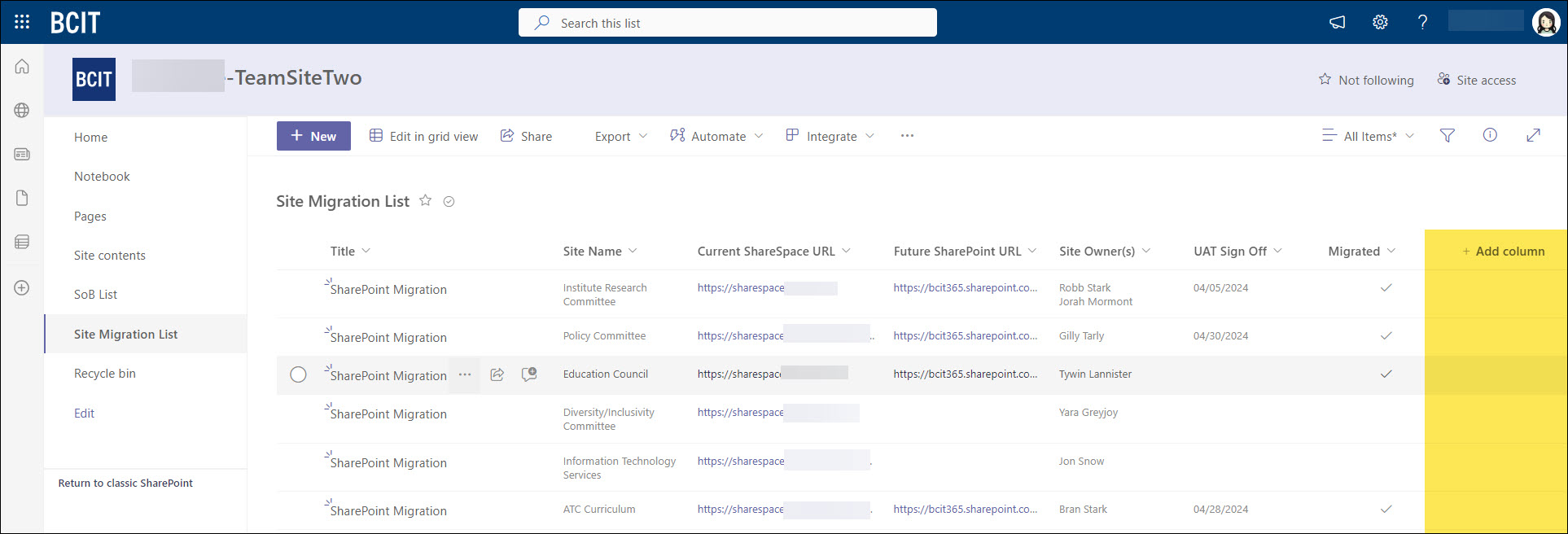
After creating the column, it will be available in the List. Create more columns to add to your List.
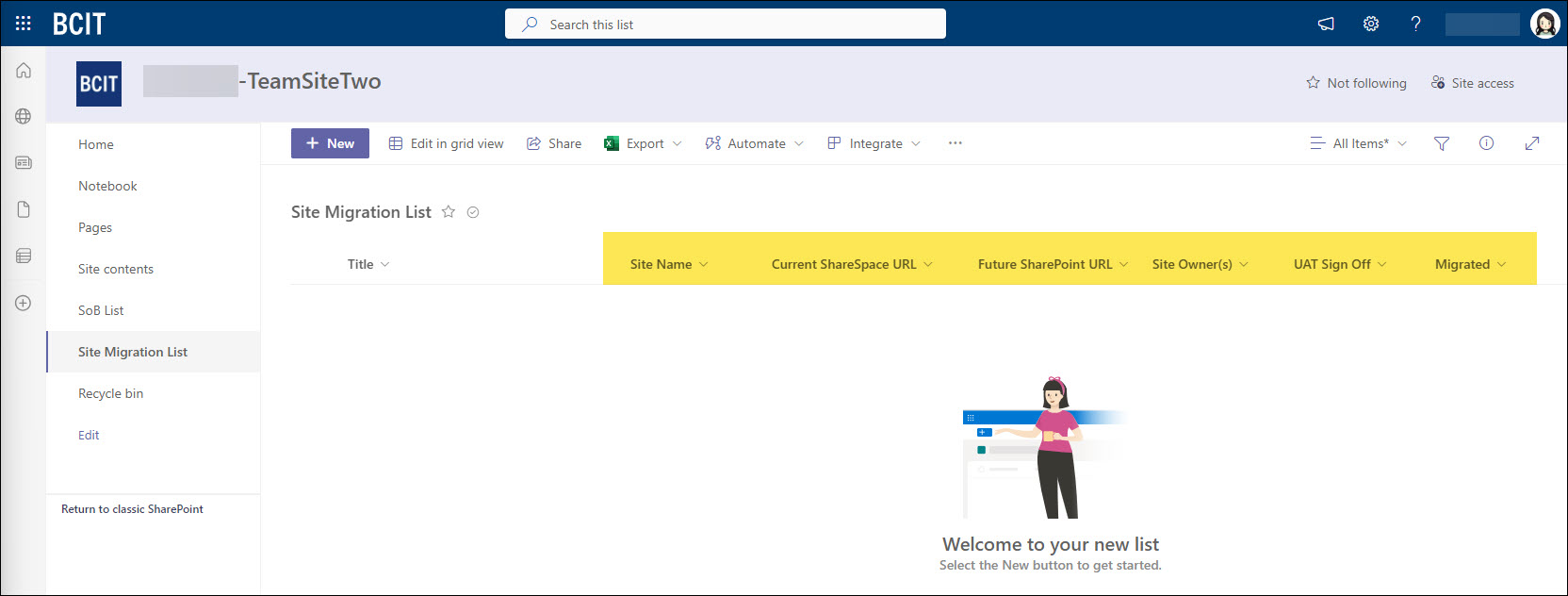
Adding information into your List after columns creation
You can add information to your list by either using the + New button, or clicking on Edit in grid view.
Using the + New button
- Click the + New button to open a side panel.
- Complete the fields in the panel.
- Click Save to finish.

Using Edit in grid view
- Click Edit in grid view.

- Click + Add new item.

- Fill in the first field, then tab through to complete the remaining fields.
- Your information will save automatically.

- When finished, click on Exit grid view.

Note that you can always add new columns to an existing List if needed.
Microsoft Support:
Creating a page in SharePoint is a way to present information, share news, or communicate updates within your site. Pages provide a structured format for organizing and displaying content, making it easier for users to consume and interact with the information you want to share.
- In your Site, click on + New, and select Page from the list of available apps.

- You’ll choose between 3 options of templates:
- Blank – Start from scratch. Add columns, text, images, links, video and more.
- Visual – Visually attractive template with a focus on images that complement your text.
- Basic text – Basic two-column template with an emphasis on text and examples of text formatting.
- Click Create Page once you have made your selection.

- Click on the title area at the top and enter a descriptive title for your page.
- Note: The title you choose will become part of the page’s URL.
- Use the “+” button in sections to add elements like texts, images, videos, documents and more. Explore the available web parts to incorporate specific functionalities.
- You can click on Save as draft in case you plan to continue working on it later.

- If you have finished editing, click Publish.

- When you publish the page, a “Help others find you page” panel will appear at the right. This is to assist users in optimizing the discoverability of their published page within the SharePoint Team Site. It offers various options to enhance the visibility of the page to other users.
- Note: Clicking on the Promote button opens this panel.

- Note: Clicking on the Promote button opens this panel.
- Once published, the new URL for this Page will appear. You can also access this Page on the Quick Launch menu bar.

Microsoft Support:
Video Training Resource
You can review this recorded training session from August 22, 2024.
Please click the CC (Closed Captioning) button to view the transcription of this video.
Note: To make navigation easier, we’ve included chapters in the video. Simply go to YouTube and click on the time stamps in the Description box.

Where to get further assistance or report an issue
If you have any further concerns, contact the ITS Service Desk or submit a ticket via the ITS Service Catalogue. When submitting a ticket, please include the word “SharePoint” and provide a detailed description to ensure proper assignment. If the matter pertains to your current SharePoint site, kindly include the URL of your site for faster resolution.